Does Claude Code Delete Old Conversations? Where Claude Code and Codex Store Sessions
Conversations you start in Claude Code's terminal app are deleted after 30 days without use, and you get no notice. Codex deletes nothing by default. So an old Claude Code session can quietly become impossible to resume, while Codex logs keep piling up on your disk. After three months, my Codex folder is 27 GB. Everything below was checked on 2026-11-27 against Claude Code 2.1.332 and Codex 0.172.0.
- An old conversation disappeared, or you want to keep them longer: see "Claude Code deletes on its own" and raise
cleanupPeriodDays. - Your disk is full: start with "How much space are you using?", then "How to delete safely". For Codex, use
codex deleteinstead of deleting files yourself. - A deleted conversation can't be resumed. Make sure you won't need it first.
Where are conversations stored?
When you talk to Claude Code or Codex, it writes the whole conversation to files on your computer, one line at a time. These files are JSONL (a text file with one record per line), usually one file per conversation. When you resume an old conversation with claude --resume or codex resume, these are the files it reads.
| Location | |
|---|---|
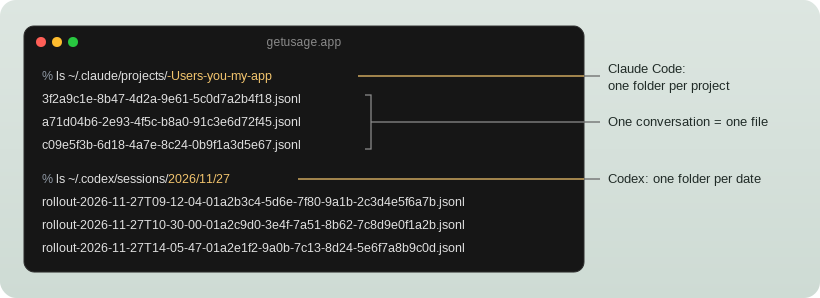
| Claude Code | ~/.claude/projects/<project>/<session id>.jsonl |
| Codex | ~/.codex/sessions/<year>/<month>/<day>/rollout-<time>-<session id>.jsonl |
~ is your home folder, such as /Users/yourname. On Windows, replace ~ with %USERPROFILE% (such as C:\Users\yourname) and use backslashes, for example %USERPROFILE%\.codex\sessions. Inside the Windows Subsystem for Linux (WSL), the paths are the same as on a Mac.
macOS hides folders whose names start with a dot. The quickest way in: in Finder, press Command + Shift + G (Go to Folder), paste ~/.codex or ~/.claude, and press Enter. On Windows, paste %USERPROFILE%\.codex into the File Explorer address bar and press Enter.
Claude Code groups conversations by project. <project> is the folder you started Claude Code in, with slashes and other symbols replaced by -. A conversation started in /Users/you/my-app goes into -Users-you-my-app, so you can tell at a glance which project it belongs to. Codex doesn't group by project. It groups by date.
Claude Code deletes on its own: 30 days by default, with no notice
Claude Code has a setting called cleanupPeriodDays (how many days to keep), and the default is 30. After you start Claude Code, it deletes conversations you haven't used in more than 30 days in the background, along with some related data. The clock starts at your last use, not at creation. A conversation you started two months ago but resumed last week stays.
The official docs are blunt about it: the sweep shows no message, and the conversation simply vanishes from the /resume list. There's no official way to get it back. If you use Time Machine, your backups may still have it.
There are two exceptions:
- Conversations you started, or last continued, in Claude Desktop or Cowork are kept past the 30 days by default. A separate setting,
desktopSessionCleanupPeriodDays, controls them. - If your company manages Claude Code settings on your computer, its value wins, and changing your own setting has no effect.
To keep conversations longer, the easiest way is to type this into Claude Code and let it make the change:
Add "cleanupPeriodDays": 3650 to ~/.claude/settings.json and don't change anything else
To edit it yourself, open ~/.claude/settings.json in a code editor such as VS Code. Don't use the Mac's built-in TextEdit. It can turn straight quotes " into curly quotes “”, which breaks the file.
- If the file doesn't exist, create it with exactly this:
{
  "cleanupPeriodDays": 3650
}
- If the file already has settings, paste
"cleanupPeriodDays": 3650,on the line right after the first{. The comma at the end separates it from the existing settings. Putting it first means you don't have to find where the last existing setting ends.
When you're done, type /status in Claude Code. If the settings file is broken, you'll see a warning there, and cleanup pauses until you fix it.
The minimum is 1. Setting it to 0 is an error, not "never delete." The docs suggest a large number such as 3650 (about ten years) for long retention. That's what I use, which is why my oldest conversation, from 2026-08-14, is still there.
Codex doesn't delete anything
Codex has no retention period for conversation logs. I read the official configuration docs and the source code and found no setting that deletes the sessions folder by age. (The source has an experimental feature that compresses old logs. It's off by default, and the conversations stay after compression.)
The easy mix-up is history.max_bytes. It lives in Codex's config file, ~/.codex/config.toml, and sounds like a size limit for your logs, but it controls a different file: ~/.codex/history.jsonl. That file only stores what you typed, so you can press the up arrow to bring it back. Full conversations aren't in it, so sessions keeps growing even when you set it.
My records: Codex reached 27 GB in three months
First, how I use it: every day I run many automated tasks with codex exec (a command that has Codex finish one job in the background and exit). That creates far more conversations than chatting in Codex. So the numbers below aren't typical, but they show one thing clearly: if nothing gets deleted, it all adds up.
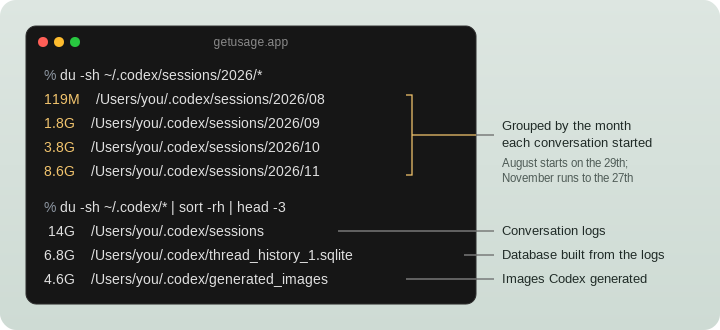
~/.codex totals 27 GB. These are the three largest items:
sessions: the conversation logs, 14 GB.thread_history_1.sqlite: 6.8 GB. According to the source code, this is a database Codex builds from the conversation logs and stores separately (SQLite, a database kept in a single file).generated_images: where Codex saves images it generates by default, 4.6 GB.
Codex sorts logs into folders by the date each conversation started. Added up by start month, conversations from September now take 1.8 GB, October 3.8 GB, and November through the 27th already 8.6 GB. Each month is larger than the last. My records begin on August 29, so August covers only three days. The largest single conversation file is 540 MB, and the lines containing images account for 277 MB of it. When an AI tool takes a screenshot or reads an image, the image is turned into a long string of text (Base64) and written into the log, so image-heavy conversations get large fast.
On the Claude Code side, ~/.claude is 7.8 GB, almost all conversation logs. If I hadn't raised the retention to ten years, anything unused for 30 days would be gone.
How much space are you using?
On a Mac or Linux, open Terminal and paste this. It only measures sizes and changes nothing:
du -sh ~/.claude ~/.codex
du measures folder sizes. -s gives one total per folder, and -h shows readable units like G and M.
To see which items are largest, use the two commands below. Each lists sizes from largest to smallest and shows the top 10:
du -sh ~/.codex/* | sort -rh | head
du -sh ~/.claude/projects/* | sort -rh | head
The second one shows how much each Claude Code project takes. The folder names tell you which project is which.
To find unusually large Codex conversations, this lists every log file over 100 MB:
find ~/.codex/sessions -name '*.jsonl' -size +100M
The file names include the date and time, so you can match them to what you were doing that day and decide whether you still need them.
On Windows, open %USERPROFILE% in File Explorer, right-click the .codex or .claude folder, and choose Properties to see its size.
How to delete safely
A deleted conversation can't be resumed. If it holds work you still want to pick up, leave it alone.
Codex: use codex delete, not the Trash
codex delete 01a2b3c4-5d6e-7f80-9a1b-2c3d4e5f6a7b
The string at the end is the session id. Replace it with your own. You'll find it at the end of the file name. For rollout-2026-11-27T09-12-04-01a2b3c4-5d6e-7f80-9a1b-2c3d4e5f6a7b.jsonl, remove rollout- and the timestamp 2026-11-27T09-12-04- from the front and .jsonl from the end. What's left is the id. A few file names have an underscore and another string after the id. In that case, take only the part before the underscore.
It asks you to confirm before deleting. There's no preview mode, so double-check the id. Two more things to know:
- If the conversation started subagents (helpers Codex sends off to do part of the work), their conversations are deleted too.
- If another conversation was forked from this one, Codex refuses to delete it, and the file stays.
Why not just delete the file? Because thread_history_1.sqlite also holds data from this conversation. According to the source code, codex delete clears that data too. If you delete only the file, the database copy stays. Also note that the database file may not shrink right away after its contents are cleared. The freed space is reused for new logs.
If you're not sure you'll need a conversation again, archive it first:
codex archive 01a2b3c4-5d6e-7f80-9a1b-2c3d4e5f6a7b
Archiving moves the log file to ~/.codex/archived_sessions, so it no longer shows up in codex resume. To bring it back, run codex unarchive with the same id. Archiving only moves the file, so it doesn't free any space.
By the way, codex resume doesn't list conversations created by codex exec by default. Add --include-non-interactive to see them.
Codex: delete everything older than 30 days
Codex has no official command to delete all conversations older than 30 days, and codex delete takes one id at a time. The two steps below are for a Mac or Linux terminal. On Windows, run them in WSL, or delete conversations one by one.
Step one: list them first. This only lists log files last modified more than 30 days ago. It deletes nothing:
find ~/.codex/sessions -name 'rollout-*.jsonl' -mtime +30
-mtime +30 means "last modified more than 30 days ago". Use +60 for 60 days. If the list includes a conversation you still need, archive it first or use a larger number.
Step two: once the list looks right, run this to actually delete them:
find ~/.codex/sessions -name 'rollout-*.jsonl' -mtime +30 -exec basename {} \; |
  cut -c29-64 |
  while read -r id; do codex delete --force "$id" </dev/null; done
Copy and paste all three lines together. The | at the end of each line joins them into one command. It does three things. It finds the same files, uses cut -c29-64 to take characters 29 through 64 of each file name (exactly the session id), and runs codex delete --force on each id. --force skips the per-conversation confirmation, which is why you check the list in step one. Each deletion prints a Deleted session line with its id.
I tested this on copies. I copied six of my own conversation files into another folder, pointed Codex at it with CODEX_HOME, and ran both steps. The three older than 30 days were deleted, and the three recent ones stayed. If you see an error along the way, it's usually one of the two cases above: a subagent conversation that was already deleted along with its parent, or a conversation another one still forks from. Those files stay, and the rest are unaffected.
Images Codex generated
generated_images holds images Codex has made. Codex's official image instructions tell it to move images a project needs into the project folder rather than leave them here. Before clearing this folder, make sure no project still points at an image inside it.
Claude Code: preview first, then claude purge
claude purge deletes the Claude Code data for one project on this computer. It doesn't touch the code and files in your project folder, but it removes more than conversations:
- The project's conversation logs, tasks, and the file edit history Claude Code keeps.
- The project's auto memory (notes Claude Code writes for itself).
- The project's entry in
~/.claude.json, including whether you trusted the folder and any MCP servers (connections to outside tools) installed for that project only. - The record of what you typed in that project.
If you only want disk space back, decide whether you can lose these too.
Add --dry-run to see what would be deleted. Nothing is deleted at this step:
claude purge --dry-run
Without a path, it lists your projects and lets you pick one, so you don't have to type a path. It prints every item it would delete and why. If the list looks right, run it again without --dry-run. It prints the same list and ends with [y/N]. It deletes only if you type y.
To decide item by item, use -i:
claude purge -i
claude purge --all deletes the data for every project, including the whole record of everything you typed in any project. Think twice before using it.
Claude Code has no command to delete a single conversation. claude rm sounds like one, but it removes a background session from the list, and, when it's safe, the worktree (a separate working folder) Claude created for it. The conversation log stays, and claude --resume can still open it.
Don't want to keep logs at all?
- Claude Code: set the environment variable
CLAUDE_CODE_SKIP_PROMPT_HISTORYto1. It then writes no conversation logs and doesn't record what you type, so the up arrow won't bring anything back either. On a Mac or Linux, start it withCLAUDE_CODE_SKIP_PROMPT_HISTORY=1 claude, which applies to that one run. In Windows PowerShell, run$env:CLAUDE_CODE_SKIP_PROMPT_HISTORY = "1"and thenclaude, which applies to everything you run in that window. For one-off tasks withclaude -p(ask once, get the answer, exit), you can add--no-session-persistenceinstead. - Codex: add
--ephemeralwhen you run a task withcodex exec, and no log file is saved. The regular interactive Codex has no equivalent switch. Settinghistory.persistence = "none"in the config only stopshistory.jsonl, notsessions.
Either way, a conversation that isn't saved can't be resumed.
Key takeaways
- Claude Code: logs live in
~/.claude/projectsand are deleted after 30 days without use. RaisecleanupPeriodDaysto keep them longer. - Codex: logs live in
~/.codex/sessionsand are never deleted automatically. Delete withcodex delete. For bulk deletion, list first, then delete. - Check how much space they use with
du -sh ~/.claude ~/.codexbefore deciding what to clear.
How the data was collected
- Disk sizes come from the author's own Mac, measured with
duon 2026-11-27. Codex logs start on 2026-08-29, and Claude Code logs on 2026-08-14. The monthly figures use Codex's date folders, so each shows the current total size of conversations started that month. - Largest-file breakdown: I added up the size of each kind of record line in the file. The lines containing images total 277 MB.
- What Codex's database is for, and what
codex deleteandcodex archivetouch, come from comments and tests in the openai/codex 0.172.0 source code. - The two bulk-deletion steps were tested on Codex 0.172.0 with six copied conversation files and
CODEX_HOMEpointing to a separate folder. The author's real~/.codexwas not touched. claude purgewas only run with--dry-run(which deletes nothing), andcodex archivewas not run. Other commands and options were checked against--helpon Claude Code 2.1.332 and Codex 0.172.0.
Sources
- Claude Code: Sessions
- Claude Code: Settings reference (cleanupPeriodDays)
- Claude Code: The .claude directory (cleanup rules and claude purge)
- Claude Code: Environment variables
- Claude Code: Agent view (claude rm)
- Codex: Configuration reference
- openai/codex: rollout file location and naming
- openai/codex: history.jsonl format
- openai/codex: resume, archive, and delete commands
- openai/codex: what deleting a conversation removes
- openai/codex: subagent conversations deleted with their parent
- openai/codex: conversation database
- openai/codex: where generated images are saved