Why Did My Codex Weekly Limit Reset Early? (Global Reset)
Your Codex weekly limit resets early when OpenAI runs a global reset on selected accounts. OpenAI refills your limit to 100% and starts a new weekly period on the spot. You lose nothing, so an early reset gives you your quota back early. The resets_at time that Codex reports is the latest moment your limit will refill. Checked on 2026-11-23.
- Tibo, who leads Codex at OpenAI (
@thsottiauxon X), resets usage for selected accounts from time to time. He usually announces it on X first. - On my own ChatGPT Plus account, 9 of the 10 weekly periods between 2026-08-29 and 2026-10-07 ended before
resets_at: 7 got a global reset, and 2 ended when I used a banked reset. Only 1 lasted untilresets_at. - After a reset, your next refresh date moves. The new date replaces the old one.
Why does the Codex weekly limit reset before the scheduled time?
ChatGPT Work and Codex share the same pricing, credits, and usage limits. On ChatGPT Plus and Business Standard, Codex has a 5-hour limit and a weekly limit. The Pro plans (Pro 100, Pro 200, and Pro 500) have a weekly limit only, with no 5-hour limit for now.
Normally the weekly limit refills at resets_at. But OpenAI often applies what its help center calls an "OpenAI-granted automatic reset", also known as a global reset. OpenAI applies it to selected accounts directly, and you don't have to claim anything. Tibo usually announces these resets on X. His posts give reasons such as fixing usage problems, reaching a user milestone, or launching a new model.
A global reset does not show up in your reset History. So what you notice is this: your used percentage drops to zero, and your next refresh date is pushed back.
How often does an early reset happen?
The author tracked their own ChatGPT Plus account from 2026-08-29 to 2026-10-07. That period covered 10 weekly periods, and only 1 lasted until resets_at:
- 7 hit a global reset and ended 1 to 6 days early, and a new period started right away. Each one ended on the day a global reset was announced.
- 2 ended 2 to 3 days early because I used a banked reset.
- In 3 of the 10, I had already used 100% of the limit. Twice a banked reset let me keep working; once I waited for
resets_at.
An unofficial site, codex-resets.com, follows @thsottiaux on X and logs each reset. As of 2026-11-23 it had logged 72 resets. The average wait between them was 5.9 days, and the longest was 67.7 days. The site notes that an AI sorts its entries, and that nothing on it is a promise from OpenAI. OpenAI also says that free resets are promotional and have no fixed schedule.
What is the difference between a global reset and a banked reset?
OpenAI's help center describes three kinds of one-time reset:
| Type | How you get it | What it refills | Shown in History? |
|---|---|---|---|
| Global (automatic) | OpenAI applies it to selected accounts | The covered limits, back to 100% | No |
| Banked | Saved to your account. You use it before it expires, when a covered limit is below 80% left (10% or less if your assistant uses it for you) | Go: monthly. Plus and Business Standard: 5-hour and weekly. Pro 100, 200, and 500: weekly | Yes, for 30 days |
| Purchased | Bought by some Plus and Pro accounts | The covered limits, right away | No |
Suppose you use a banked reset, and a global reset arrives later. The global reset brings you back to 100%, not 200%. Banked resets that you haven't used stay in your account.
What does resets_at mean if resets can happen early?
Think of resets_at as the latest time your limit will refill. If no reset of any kind comes first, that is when your week ends.
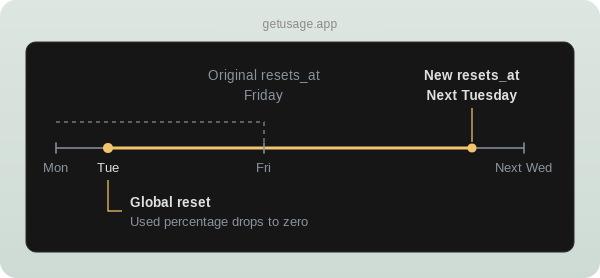
When a reset does come early, your schedule moves with it. OpenAI gives an example: a weekly period was due to end on Friday, but a reset restarted it on Tuesday. The next refresh is then the following Tuesday, and the Friday date no longer applies.
How can you check your Codex limit and countdown?
There are two free official ways, and a third option if you want the number on screen all the time:
- The usage dashboard. Open the usage dashboard on the web, or Settings > Usage & billing in the desktop app. It shows how much you have left, when the limit refills, and any banked resets under Available.
- Codex CLI. Run
/statusto see how much you have left. To use a banked reset, run/usageand choose Redeem reset. - The
usageapp.usageis free and open source. It reads your local Codex logs and shows your 5-hour and weekly limits, with countdowns, in the macOS menu bar or the Windows system tray. A limit turns red as you get close to it, and you can get a notification at 50%, 70%, 80%, 90%, or 95%. The default is 90%. After a global reset, the menu bar switches to the new countdown the next time you use Codex, without opening the usage page.
Key takeaways
- A Codex weekly limit resets early when OpenAI runs a global reset. You get a full limit back and a new weekly period.
- On my own Plus account, of the 10 weekly periods from 2026-08-29 to 2026-10-07, 7 ended 1 to 6 days early after a global reset, 2 ended when I used a banked reset, and only 1 lasted until
resets_at. resets_atis the latest time your limit will refill. To see the current number, use the usage dashboard,/status, or theusageapp.