Claude Code or Codex Not Working? Usage Limit or Outage
When Claude Code or Codex suddenly stops, first check whether the error message says "limit" and gives a reset time. If it does, you've hit your limit, and it comes back at that time. If you see words such as 529, 500, or capacity instead, the problem is on the provider's servers. Wait a few minutes, try again, and then check the official status page. Checked on 2026-11-26.
- Between 2026-08-13 and 2026-11-26, I hit the Claude Code limit 37 times and ran into server problems 9 times. In Codex, I hit the limit 15 times and ran into server problems 7 times.
- There is a third case: you're not logged in, or you can't reach the server. Then the message asks you to type
/loginor to check your internet connection. - Both providers have an official status page. For Claude, check
Claude CodeandClaude API. For Codex, checkCodex API.
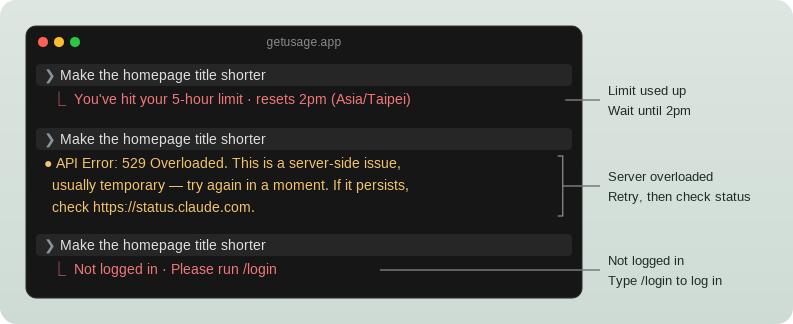
What do you see when you hit your usage limit?
When you hit your limit, Claude Code shows a message in red below your prompt. The top message is for the 5-hour limit, and the bottom one is for the weekly limit:
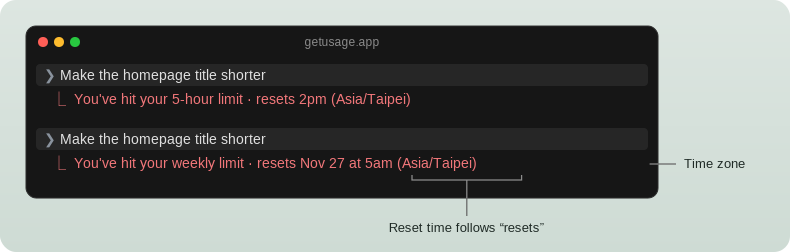
The time after resets is when your limit resets, and the time zone is in parentheses. Older versions of Claude Code called the 5-hour limit a session limit and wrote You've hit your session limit · resets 9:20pm. It means the same thing.
If you hit your limit while Claude Code is in the middle of a response, it may finish the current step first. In that case you see Usage limit reached · wrapping up. This message doesn't give a reset time, so check Settings > Usage in claude.ai or Claude Desktop. When Does the Claude Code Weekly Limit Reset? explains how.
When you hit your Codex limit, Codex shows:
You’ve hit your usage limit. Upgrade to Pro (https://chatgpt.com/explore/pro), visit https://chatgpt.com/settings/usage to purchase more credits or try again at 5:07 AM.
The time after try again at is when you can use Codex again.
What to do: Wait until the time in the message. Restarting the app or logging in again does not bring your limit back sooner.
What do you see during an outage (529, 500, at capacity)?
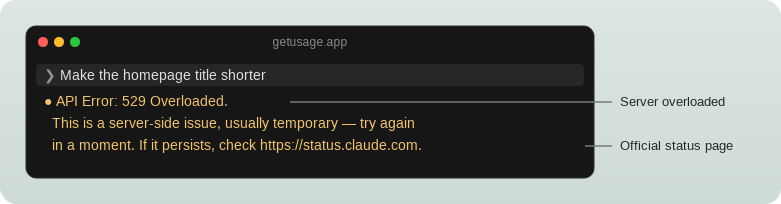
In Claude Code, the most common one is 529, shown in yellow:
Another one is 500:
API Error: 500 Internal server error. This is a server-side issue, usually temporary — try again in a moment. If it persists, check https://status.claude.com.
Anthropic's error documentation explains them this way: 529 means the API is temporarily overloaded, and 500 means an unexpected error happened inside Anthropic's systems. Both are problems on Anthropic's side, and neither has anything to do with your limit.
When the Codex servers are overloaded, Codex shows:
Selected model is at capacity. Please try a different model.
Or:
We’re currently experiencing high demand, which may cause temporary errors.
at capacity means that the model you picked is overloaded right now, so the message suggests switching to another model.
What to do: If Codex asks you to switch models and you can, follow the prompt. If you want to keep the same model, wait a few minutes and send your request again. If it keeps failing, check the official status page to see whether there is an ongoing incident.
If it's not the limit or an outage, what else could it be?
There are two more cases: you're not logged in, or you can't reach the server.
When you're not logged in, Claude Code shows:
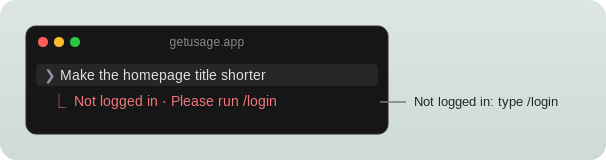
Type /login as the message says, and log in again.
When Claude Code can't connect to the internet, it shows:
API Error: Can't reach the API server — check your internet or DNS (ENOTFOUND)
If the connection drops in the middle of an answer, Claude Code shows the message below. It means that the answer above it may be incomplete:
API Error: Connection lost mid-response. The response above may be incomplete.
When Codex loses its connection, it shows Reconnecting to server… and reconnects on its own.
What to do: If you're not logged in, type /login. If you can't connect, open another website first to check your own internet connection. If other websites work and only Claude Code or Codex can't connect, check the official status page.
Which case happens most often?
I scanned every Claude Code and Codex log on my computer, from 2026-08-13 to 2026-11-26. When several windows hit the same limit at the same time, it counts once. Server problems and dropped connections work the same way: events less than 10 minutes apart count as a single incident. The table does not include times when I wasn't logged in.
| Limit reached | Server problem | Connection lost | |
|---|---|---|---|
| Claude Code | 37 | 9 | 3 |
| Codex | 15 | 7 | 0 |
Of the 37 Claude Code limits, 32 were the 5-hour limit and 5 were the weekly limit.
So when the tools suddenly stopped working for me, the cause was usually a usage limit, not an outage. But outages are not rare either. The two tools had 16 between them, a little over four a month on average.
Which part of the status page should you check?
Both providers have a public status page that shows whether each service is working right now:
- Claude: status.claude.com. If you use Claude Code, check
Claude CodeandClaude API (api.anthropic.com). - Codex: status.openai.com. If you use the Codex CLI (Codex in the terminal), check
Codex API.
The OpenAI status page also lists Codex Web and Codex in ChatGPT Desktop. These are the web and desktop versions, so the Codex CLI may still work even when they show a problem. For example, in the early hours of 2026-11-26, Codex Web showed degraded performance, but Codex API was operational.
How can you tell which case it is at a glance?
usage is a free, open-source app. It shows your limits and the official service status in one place, in the macOS menu bar or the Windows system tray:
- Limits: The 5-hour and weekly limits for Claude Code and Codex, with reset countdowns. When a limit reaches 100%, you know that you've used it up.
- Official status: usage checks the Claude and Codex status pages every 5 minutes. It only looks at
Claude Code,Claude API, andCodex API, and it skips items such as the web and desktop versions that don't affect the CLI. When there is a problem, the limit card shows a notice such as⚠ Claude service issue: Partial outage.
So when a tool suddenly stops working, read the error message first, and then glance at the menu bar. If a limit is at 100%, you've used it up. If you see a service notice, the provider is most likely having an outage. Because usage checks only every 5 minutes, the menu bar may still look normal right after an outage starts. In that case, trust the error message.
Key takeaways
- A message with
limitand a reset time means you've hit your limit. Wait until that time. 529or500means the provider's servers had an error or are overloaded.capacityorhigh demandmeans that your model or the whole service is too busy. Wait a few minutes and try again, or switch models as the message suggests, and check the status page.- A message that asks you to
/loginmeans you're not logged in. A message that asks you to check your internet means you should test your own connection first, and then check the status page. - Over three months of my logs, Claude Code hit its limit 37 times and had 9 server problems. Codex hit its limit 15 times and had 7 server problems.